Consignment Software for First-Time Organizers
Software for starting a consignment sale makes the first event feel manageable. Consignment Helper guides you through every step with a Sale Builder wizard, beginner-friendly interfaces, and plain-language help throughout. No prior experience needed. Just follow the steps and focus on what matters: building your community.
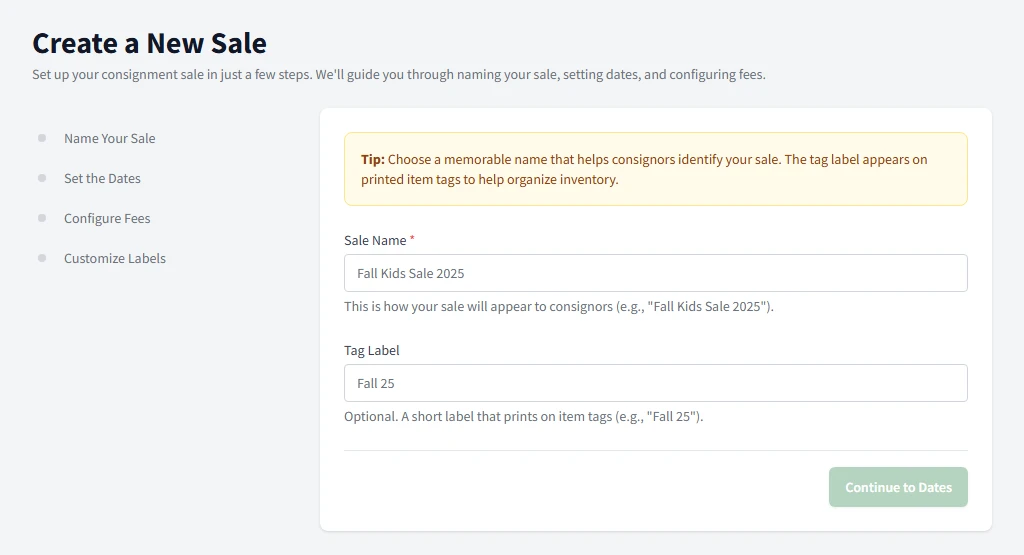
The Sale Builder wizard walks you through every step-no prior experience needed.
Software for Starting a Consignment Sale, Without the Guesswork
You've decided to organize a consignment sale for your school, church, or community group. Maybe you've shopped at consignment sales before, but running one? That's a different story. How do you set pricing? What about consignor registration? How does checkout actually work? The questions pile up fast.
Most consignment software assumes you already know what you're doing. It throws you into complex dashboards with industry terminology and expects you to figure it out. That's backwards. Software should teach you as you go, not assume expertise you don't have yet.
How Consignment Helper Guides You
Step-by-step tools designed for organizers who are learning as they go.
Sale Builder Wizard
Configure your entire sale in one guided flow. Set dates, pricing rules, consignor fees, and checkout settings step by step. The wizard explains each option in plain language.
Explore Sale Builder ->Consignor Self-Service
Consignors register themselves, enter their own items, and print their own tags at home. Less work for you, fewer questions to answer, and no data entry marathons.
Explore Self-Service Portal ->60-Second Checkout Training
Your volunteers master the checkout interface in under a minute. Large buttons, clear labels, and no confusing menus mean you spend less time training and more time running your sale.
Explore Volunteer-Friendly POS ->Time Slot Scheduling
Spread item drop-offs across manageable time windows. Avoid the chaos of everyone showing up at once. Consignors pick their own slots online.
Explore Time Slots ->Your First Sale, Simplified
Configure
Use the Sale Builder wizard to set up your event. Answer simple questions about dates, pricing, and fees. The system configures everything based on your answers.
Register
Consignors sign up and enter items themselves through the online portal. They print tags at home. You don't touch any data entry.
Check In
Scan barcodes to verify items at drop-off. The system confirms each item matches what was entered online. Catch problems before they hit the floor.
Sell
Run checkout on any laptop or tablet you own. Volunteers learn the interface in under a minute. When the sale ends, payouts calculate automatically.
Questions Every First-Time Organizer Asks
When you're new to consignment sales, you don't know what you don't know. Here are the questions we hear most from first-time organizers-and how Consignment Helper addresses each one.
What if you're not sure how to set pricing?
The Sale Builder walks you through common pricing approaches. Do you want consignors to set their own prices within guidelines? Or standardized pricing by category? Do you want minimum prices? Maximum prices? The wizard explains each option and shows examples from successful sales. You make informed decisions without needing prior experience.
What if you don't know what percentage to keep?
Most first-time sales keep 30-40% for the organization, but it varies by your goals and consignor expectations. The software lets you set any split you choose, and shows consignors exactly what they'll earn before they commit. Transparency builds trust from your very first sale.
What if you're unsure how many volunteers you need?
For a typical first sale, plan on 2-3 volunteers per checkout station, plus helpers for check-in, floor organization, and customer assistance. The volunteer scheduling feature helps you create shifts and track sign-ups. You'll learn what works for your specific venue and crowd size.
What if something goes wrong during the sale?
Every sale has hiccups-a barcode that won't scan, a customer dispute, a volunteer who doesn't show up. The key is having systems that handle exceptions gracefully. Consignment Helper includes manual item entry for scanning issues, the ability to cancel transactions and restore them if needed, and opening new checkout stations on any device in seconds.
What You'll Learn as You Go
The best part of beginner-friendly software? It teaches you best practices while you work.
Contextual Help
Every setting includes an explanation of what it does and why you might choose different options. You learn consignment best practices as you configure your sale.
Sensible Defaults
Not sure what to choose? The system comes with sensible starting configurations. Customize as you learn what works for your community.
Plain Language
No industry jargon or confusing terminology. The interface speaks like a friend who's run sales before and wants to help you succeed.
Guided Workflows
Major tasks like opening registration or starting checkout guide you through each step. You won't miss important settings or skip crucial configurations.
Quality Control at Check-In
Verify items meet your standards when consignors drop off. Accept or reject items before they reach the sales floor. Catch issues early.
Post-Sale Reports
After your sale, reports show total sales, consignor payouts, category counts, and financial breakdowns-everything you need to plan your next event.
Start Small, Learn, and Grow
Your first sale doesn't need to be perfect-it needs to work. Start with manageable goals: maybe 50 consignors and a few hundred items. Learn what works for your community. Consignment Helper scales with you as you grow. The same software that helps you run your first 200-item sale can handle 20,000 items when you're ready. There's no need to switch systems as you expand.
First Sale Goals
Focus on running a smooth event, not maximizing profits. Build trust with consignors. Train volunteers. Learn your venue's quirks.
Future Growth
With a successful first sale under your belt, you'll attract more consignors and shoppers. The software grows with you-no migration required.
No Hardware to Buy or Rent
Consignment Helper runs entirely in your web browser. Use the laptops, tablets, and phones you already own. Pair with any standard USB barcode scanner for checkout. No special equipment, no installations, no IT headaches.
Works on any laptop
Works on tablets
Standard USB scanners
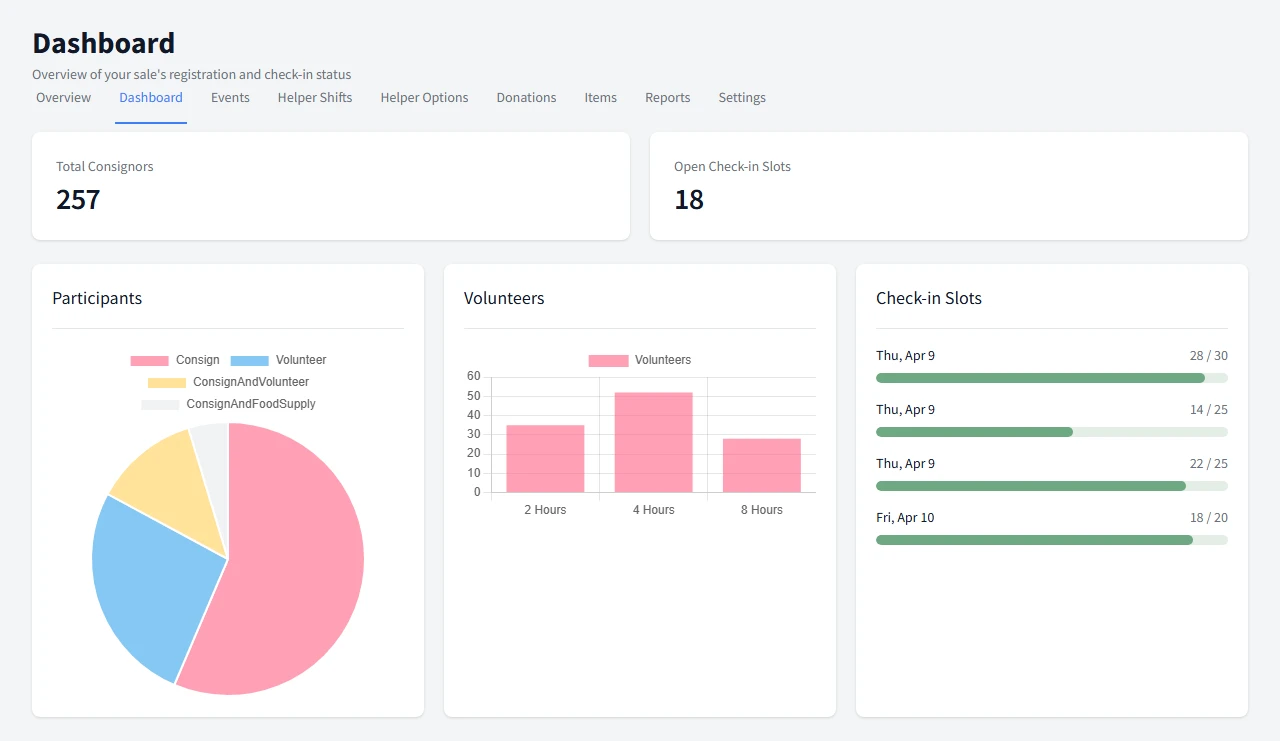
Your Command Center
See registrations, volunteers, and check-in capacity at a glance. The dashboard tells you exactly what needs attention.
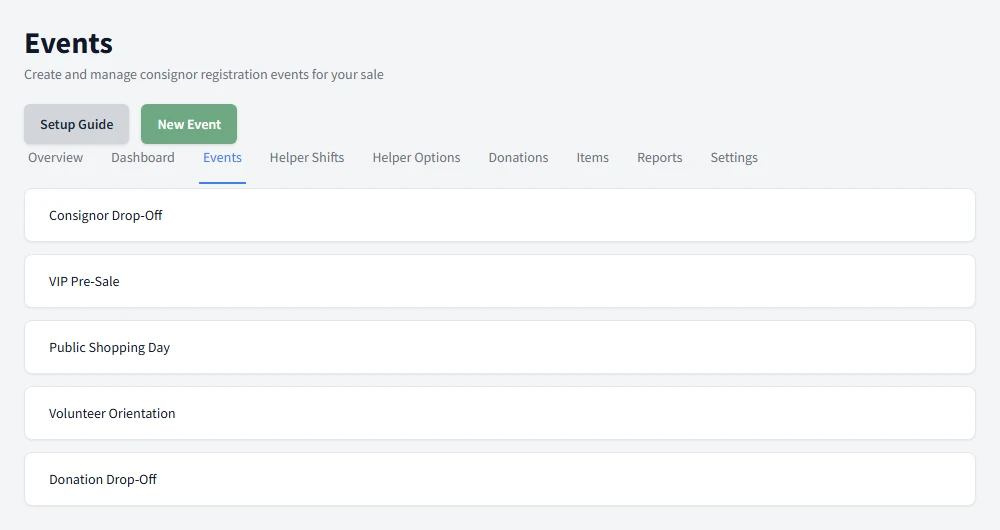
Organized Event Timeline
Check-in days, presale events, and public sale days all organized in one clear list with registration counts.
Ready to Run Your First Sale?
See how Consignment Helper guides first-time organizers from idea to successful sale day.