
Billing help
Canceling and Invoices
Learn how to cancel billing, what you can do in our payment partner's billing portal, and how refunds are handled.
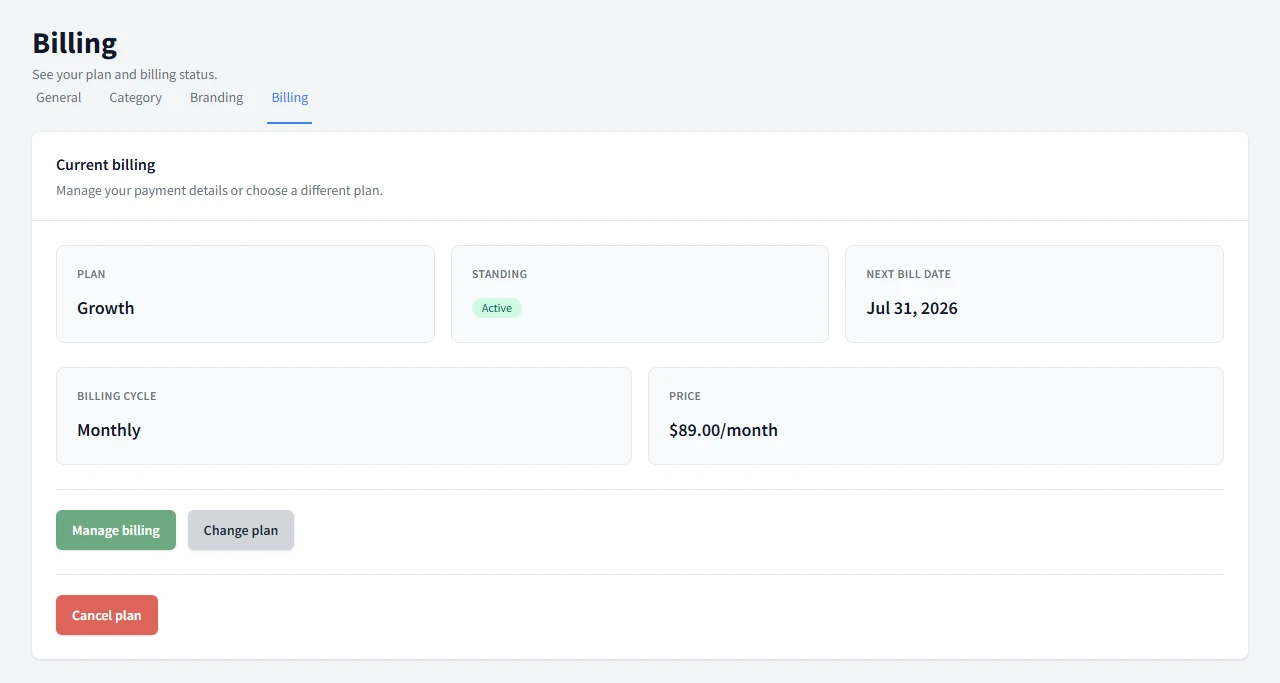
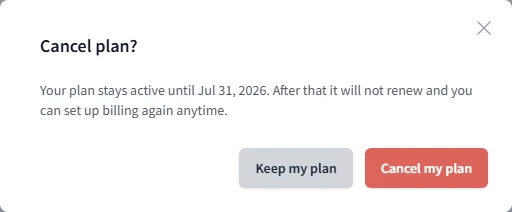
You can cancel from Billing -> Cancel plan. Your plan stays active until the current period ends, then it does not renew. If you come back later, you can set up billing again any time.
How canceling works
Canceling schedules the plan to stop at the end of the current period, not right away. That gives you time to finish the sale and keep access until the period closes.
Where invoices and payment methods live
Open Manage billing to reach our payment partner's billing portal, a secure page you're redirected to and then brought back from automatically. That is where you view invoices, update your payment method, and switch plans. Canceling is not available there. If you want to cancel, use the Cancel plan button in Consignment Helper instead.
Refunds
Refunds are handled case by case through support. We do not set a fixed refund rule in the product, so reach out and we will take a look.
Need the bigger billing picture? Return to the billing help hub.
Common Questions
How do I cancel?
Open Billing, choose Cancel plan, and confirm the change. Your plan stays active until the current period ends.
Will I get a refund?
Refunds are handled case by case through support. We do not set a fixed refund rule in the product.
Where are my invoices?
Open Manage billing to reach our payment partner's billing portal. That is where you view invoices, update your payment method, and switch plans.
Can I cancel from the billing portal?
No. Canceling is only available from the Cancel plan button in Consignment Helper. The billing portal is for invoices, payment methods, and switching plans.
Do I leave Consignment Helper to open the billing portal?
Yes. Manage billing takes you to a secure page hosted by our payment partner, and you are brought back to Consignment Helper when you are done.
Can I come back after canceling?
Yes. You can set up billing again any time, whenever you are ready to start a new sale.