Billing help
Setting Up Billing
Learn why the Set up billing banner appears, what happens when you check out with our payment partner, and why it can take a moment to show as active.

When billing is not activated yet, the Set up billing banner appears so you know the account still needs a plan. The account stays open while you finish setup, so nothing is blocked, and there is no deadline to worry about.
Why the banner appears
The banner is a simple reminder that billing still needs activation. It does not shut anything down.
How to finish activation
- Open Billing from your account settings.
- Choose Set up billing.
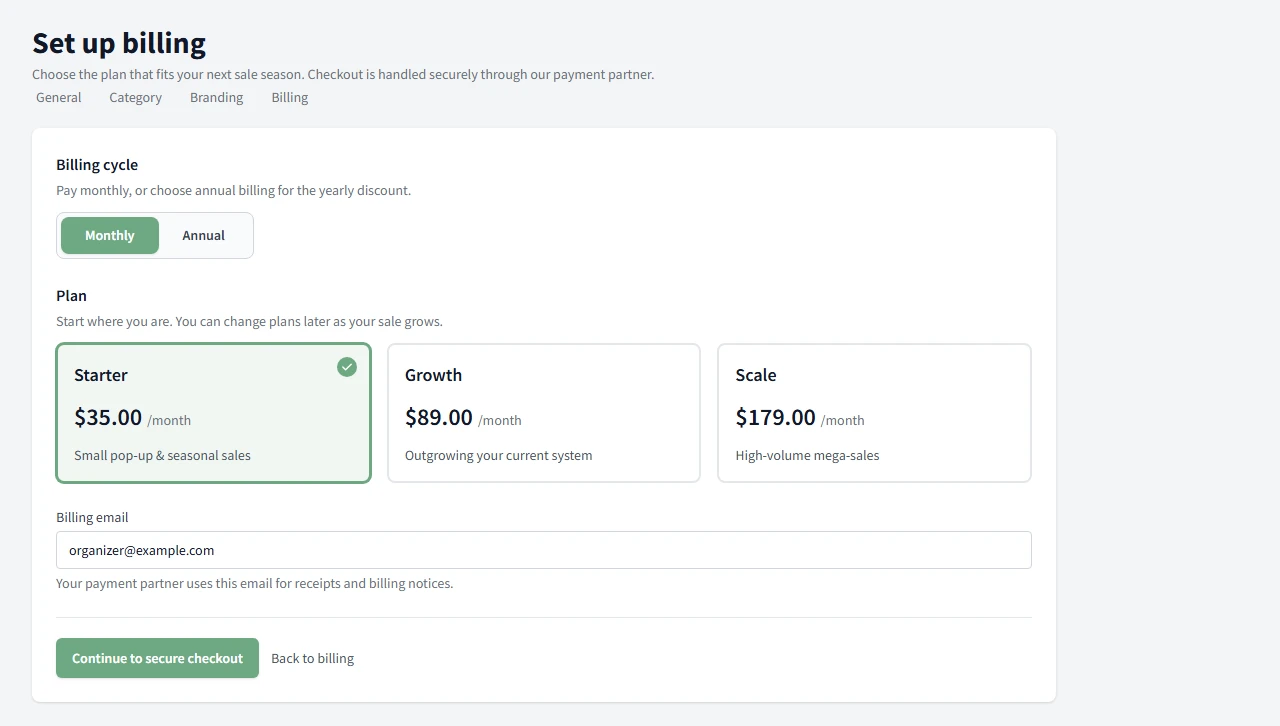
- Pick a plan: Starter, Growth, or Scale.
- Choose Monthly or Annual billing.
- Enter the billing email that should receive receipts and billing notices.
- Choose Continue to secure checkout.
The plan picker shows the monthly and annual options before you move on to checkout.
What happens at checkout
Choosing Continue to secure checkout takes you to a checkout page hosted by our payment partner, not a page on Consignment Helper. This keeps your card details off our servers entirely. Enter your payment details there and confirm, or choose Back to billing to cancel and return without being charged.
If your card is declined, the checkout page lets you know right away so you can try a different card without losing your plan selection.
After you finish checkout
Once checkout succeeds, you are brought back to Consignment Helper automatically. We wait for our payment partner to confirm the payment before marking your plan active, so it can take a few seconds, and occasionally longer, to show up on the Billing page. If it still says the account is not activated right after checkout, give it a moment and refresh. You do not need to submit anything again.
What stays open
Your account stays open while billing is not activated, and you can come back to finish setup whenever you are ready.
Need the bigger billing picture? Return to the billing help hub.
Common Questions
Why am I being asked to set up billing?
The account is not activated yet, so we show the banner to help you finish setup when you are ready.
What happens if I don't set up billing yet?
Your account stays open. Nothing is blocked, and you can finish billing setup later.
Will I leave Consignment Helper to pay?
Yes. Checkout happens on a secure page hosted by our payment partner, and you are brought back to Consignment Helper automatically once it is done.
Why doesn't my plan show as active right away?
We wait for our payment partner to confirm the payment before updating your account. That usually takes just a few seconds, but it can occasionally take a bit longer. Refresh the Billing page if it has not updated yet.
What if I close the tab during checkout?
Nothing is charged unless checkout fully completes. Come back to Billing and choose Set up billing again to pick up where you left off.
Is my card information safe?
Yes. Your card details go directly to our payment partner's secure checkout page. We never see or store your full card number.